HK
HK
1.
Choose a website builder
2.
Get an ecommerce hosting solution
3.
Purchase a domain name
4.
Pick and customize a website theme
5.
Define your ecommerce website structure
6.
Add your products
7.
Set up payment solutions
8.
Establish a shipping and return policy
9.
Comply With Data Privacy Laws
10.
Ensure website functionality
11.
Track your KPIs
Building an ecommerce website is no longer optional – it’s now a necessity for every entrepreneur who’d want to maximize their business potential.
In the U.S., for instance, 74% of consumers now prefer online shopping over buying from a brick-and-mortar store. And in a separate survey that tracked the shopping channels jointly, it was established that 64% of all buyers’ journeys begin from the web. That is a confirmation that a strong online presence will drive even your in-store sales.
Through this guide, you should be able to get yours up and running without using any coding skills, technical assistance, or costly infrastructure.
Here’s how to build an ecommerce website in 10 basic steps:
For starters, you’ll need an ecommerce platform which will form the foundation of your ecommerce website.
The platforms themselves come in the form of end-to-end software-as-a-service solutions, complete with pre-configured provisions for powering the front-end and back-end functions of your online store.
On the market, you’ll find a wide range of options, each with its own unique architecture, pricing, and capabilities. To select the best one for your ecommerce store, we’d advise you to prioritize the following:
Those feature considerations above will lead you to ecommerce platforms such as:
The ecommerce platforms that we mentioned above are full-stack ecommerce platforms. That means they take care of web hosting, in addition to powering online stores.
This is a privilege you won’t get from on-premise solutions such as WooCommerce and Magento. Both are open-source software that can only be deployed on third-party infrastructure.
The infrastructure, in this case, is web servers from ecommerce hosting solutions. And, in particular, you might want to try out renowned hosting providers such as Bluehost, GoDaddy, SiteGround, A2 Hosting, or DreamHost.
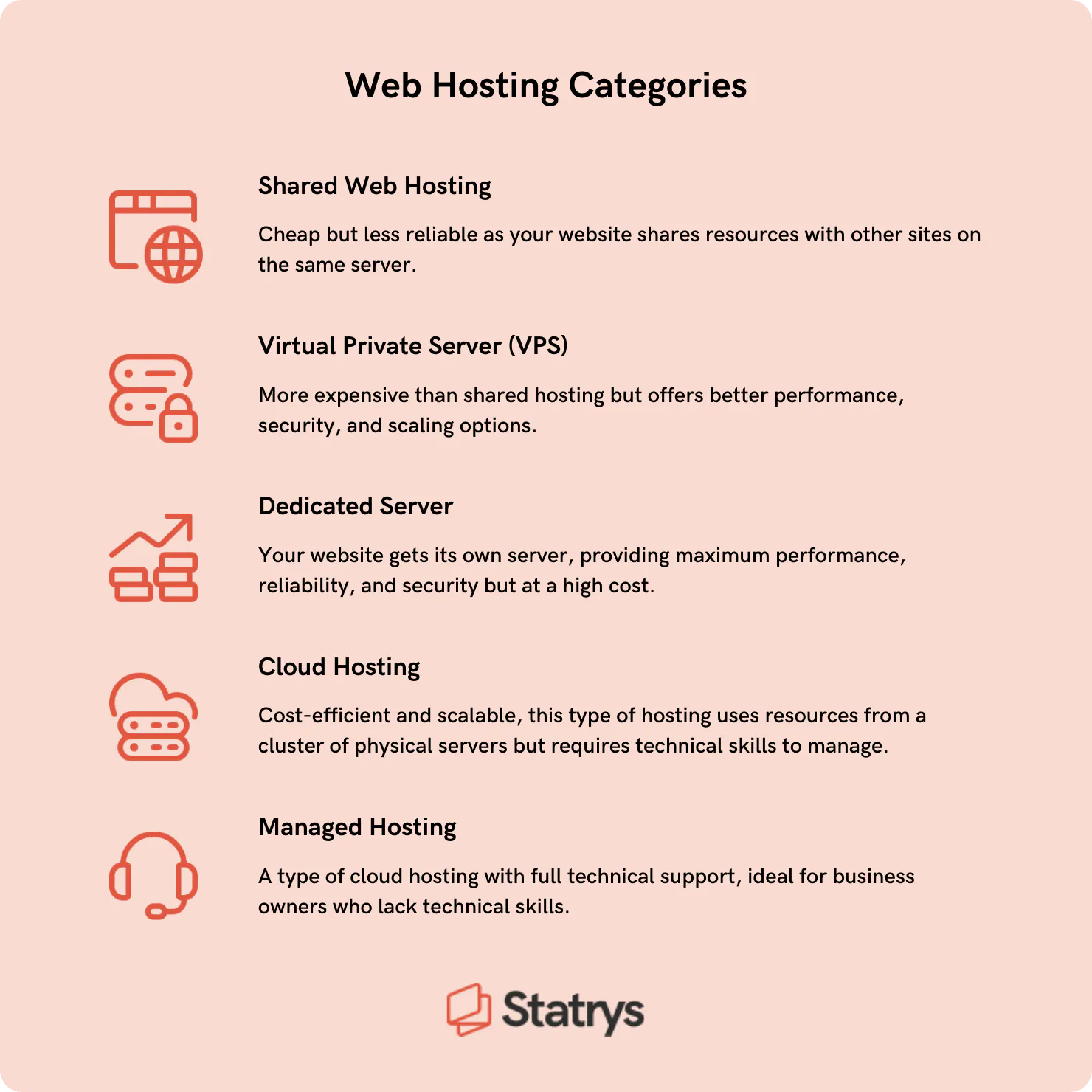
All five of them offer server allocations in the following web hosting categories:
When developing an eCommerce website, align your site with business goals and customer requirements. Select a platform suitable for your business size: for beginners, Shopify is a budget-friendly option, while established businesses should opt for more custom solutions like Web Flow, WordPress or Joomla, to develop a more professional, user-friendly design, that can boost user experience and conversion rates.
Prioritize hosting quality, as faster websites tend to have higher conversion rates. Kinsta is recommended for their state-of-the-art security and speed.
A domain name is the web address that visitors will use to identify and access your ecommerce store. This is what will point their browsers toward your site.
To reserve a domain name, you should find a domain registrar that is duly accredited by the Internet Corporation for Assigned Names and Numbers (ICANN). Examples include Domain.com, Namecheap, Hover, and Google Domains.
You could, otherwise, register the domain name with your web host. Ecommerce hosting solutions like GoDaddy, Bluehost, and Dreamhost happen to double up as domain registrars. The same provision is available on all-inclusive ecommerce platforms such as Shopify, Wix, and BigCommerce.
Other features to look out for from the best domain registrars include a free SSL certificate, along with free WHOIS privacy protection.
Expert Insight
When selecting a domain registrar, it's essential to prioritize security against domain hijacking and consider additional services like email and web hosting. Assess the registrar's renewal policy/prices and the convenience of consolidating infrastructure with one provider. Don't forget to check the transfer policy for domain registration because it determines the flexibility and ease of transferring your domain registration to another registrar in the future if needed.
— Swapnil Jamdade, Solutions Architect
Whichever registrar you ultimately choose, ensure that you’ve exhaustively brainstormed domain name ideas before proceeding. You need a short, creative, and memorable domain name that reflects your business.
But, don’t go for a generic one – instead, try to find a brandable name without infringing any copyrights or trademarks.
For relevant suggestions, you could try running your brainstormed ideas through free domain name generators like DomainWheel. You just need to enter a keyword or phrase, and its AI engine will provide contextual suggestions of the available domain names across different TLDs.
Top Level Domains (TLDs) are the suffix extensions that come right after the domain name. They reveal more details about the purpose, owner, and geographical focus area of the ecommerce website.
Some of the TLDs that you could have on your online store’s URL are:
Feel free to play around with different domain name-TLD combinations for your ecommerce store. When trying out different TLDs, you may find a unique domain name that will work best with your brand.
💡Recommendation: When you find the best fitting TLD, you can proceed with either a 1-year or 10-year domain registration.
This is the stage where you get to build an ecommerce website front-end. And to save you the trouble of creating everything from scratch, the best ecommerce platforms provide a host of customizable website themes and templates.
A website theme is a pre-built site that serves as a design blueprint for new websites. Instead of starting with a blank canvas, you get to work your way up from a ready-made website prototype.
You just need to pick one that fits your business plan, tweak some minor appearance settings to match your brand, add content, and then publish the entire composition as your ecommerce website.
The process is particularly seamless on ecommerce platforms like Shopify, Wix, and Squarespace. They all come with an array of professional website themes that you can edit visually on their accompanying drag-and-drop website builders.
To help new businesses, some companies offer deals to get you started. For example, Shopify offers free trials for interested businesses.
Wix, for instance, boasts a collection of over 800 free templates, 130 of which are reserved for online stores across different ecommerce industries. You’ll find nearly the same volume of ecommerce-oriented options in Squarespace’s template library, all of which are free to use.

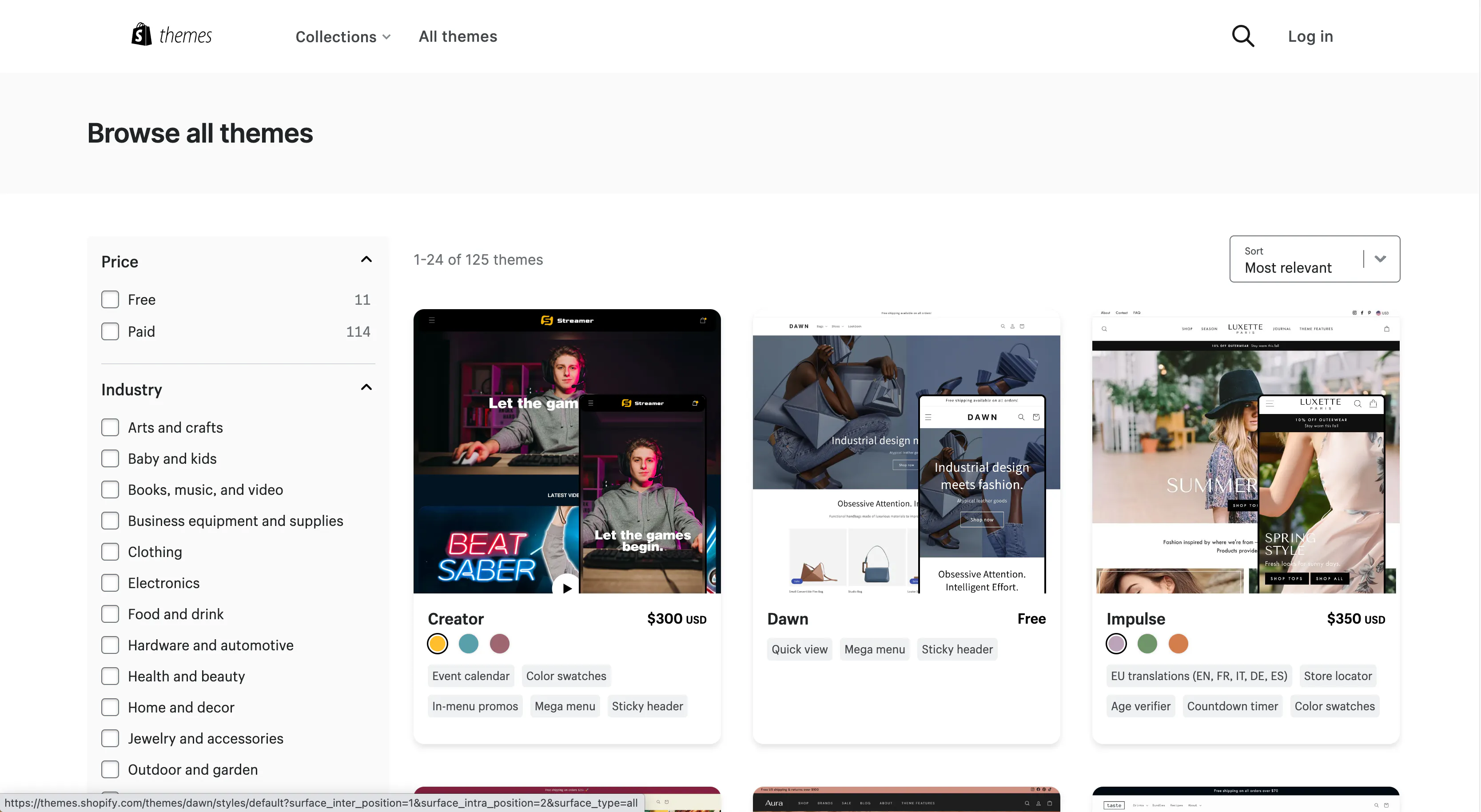
Shopify, on the other hand, features a total of 125 online store themes. Only 11 of them are free, while the rest are premium themes that cost $150 - $350. Nevertheless, the designs here are superior to both Wix’s and Squarespace’s in terms of depth, elegance, and functionality.
If you want unrestricted customization capabilities, the best ecommerce platform would be WooCommerce. The theme options in its library and the WordPress repository add up to thousands, most of which are free. With the right coding skills, you should be able to edit them extensively from the underlying source code.
Consider the following factors when choosing a theme or a template for your ecommerce website:
49% of shoppers today are using Google to discover or find new products. And to reach those customers, one of the things you’ll need in your ecommerce store is a well-organized URL structure. This is how you make it easy for Google’s bots to crawl through your ecommerce website, read your web pages, and understand the business model plus its products.
You could, for example, arrange your URLs in a hierarchical structure. Your landing pages could link directly to product categories, which would then lead to their respective sub-categories, and so forth.
Case in point – imagine running an online store that deals in men’s and women’s clothing. If you applied the hierarchical URL structure, the homepage would channel visitors to either of these two category pages:
Then in the men’s section, you could have subcategories like:
The subcategory level would ultimately usher shoppers into the corresponding product options, followed by the product pages.
Google additionally advises business owners to pay attention to the characters in their URL paths. Every page in your online store should have a short web address that contains descriptive keywords in the URL path.
For example, instead of this…
You should describe the product itself with relevant keywords like…
At least then, Google’s crawlers will index your product page within the appropriate SERPs.
And if you happen to have multiple variants of the same product, Google would appreciate it if you picked just one of the variants to be showcased in the search results. It won’t support any more than that.
To proceed, just set your selected primary variant as the canonical URL. Google will then fetch that snippet plus the accompanying product details for placement in the SERPs.
Expert Insight
The most important thing to keep in mind is to maintain consistency in your URL structures across the website. Use a standard format that is easy to read and follow, such as using lowercase letters, and hyphens to separate words, and avoid special characters or space. It is important because a well-structured URL can help users understand the site's navigation and hierarchy.
Lastly, try and incorporate relevant keywords into your URLs, preferably in a logical and natural manner. This can provide additional context to search engines and improve the page's visibility for relevant search queries.
— Guy Sanohlam, Chief Marketing Officer
Your product pages affect customers' purchasing decisions, so it's best to optimize them by considering the followings:
As you start adding individual products, be mindful of SEO and the marketing strategies that’ll follow when you start selling online.
The best place to start is with thorough SEO research and finding the best keywords for capturing your target market.
We also recommend leveraging the likes of SEMrush, Ahrefs, Moz, or SpyFu to help with keyword research, competitor research, market analysis, and content optimization. These tools will allow you to build a good foundation for your website and help you avoid potential SEO issues later on which can be costly to fix.
Then if you hope to have your products featured by Google as rich snippets, you might want to insert product schema markup into the pages, such as Product schema, FAQs and BreadcrumbList.
You don’t need any coding skills for that. Just install a relevant product schema extension into, say, your WordPress website and then use visual tools to define your structured data. Remember to embed even the product reviews, shipping details, ratings, pricing, etc.
Expert Insight
With a growing number of users accessing websites through mobile devices, it's wise to ensure that your product pages are easily accessible and user-friendly on mobile devices.
Neglecting mobile optimization not only disregards a significant portion of your potential user base but also sends a signal to search engines like Google that you are not catering to the needs of mobile users. This can result in a poor user experience and have a significant impact on your SEO performance.
— Guy Sanohlam, Chief Marketing Officer
Another element you shouldn’t take for granted is the product image. This is the first thing that 75% of online shoppers reportedly look at when trying to make purchasing decisions.
Here are what audiences want to see
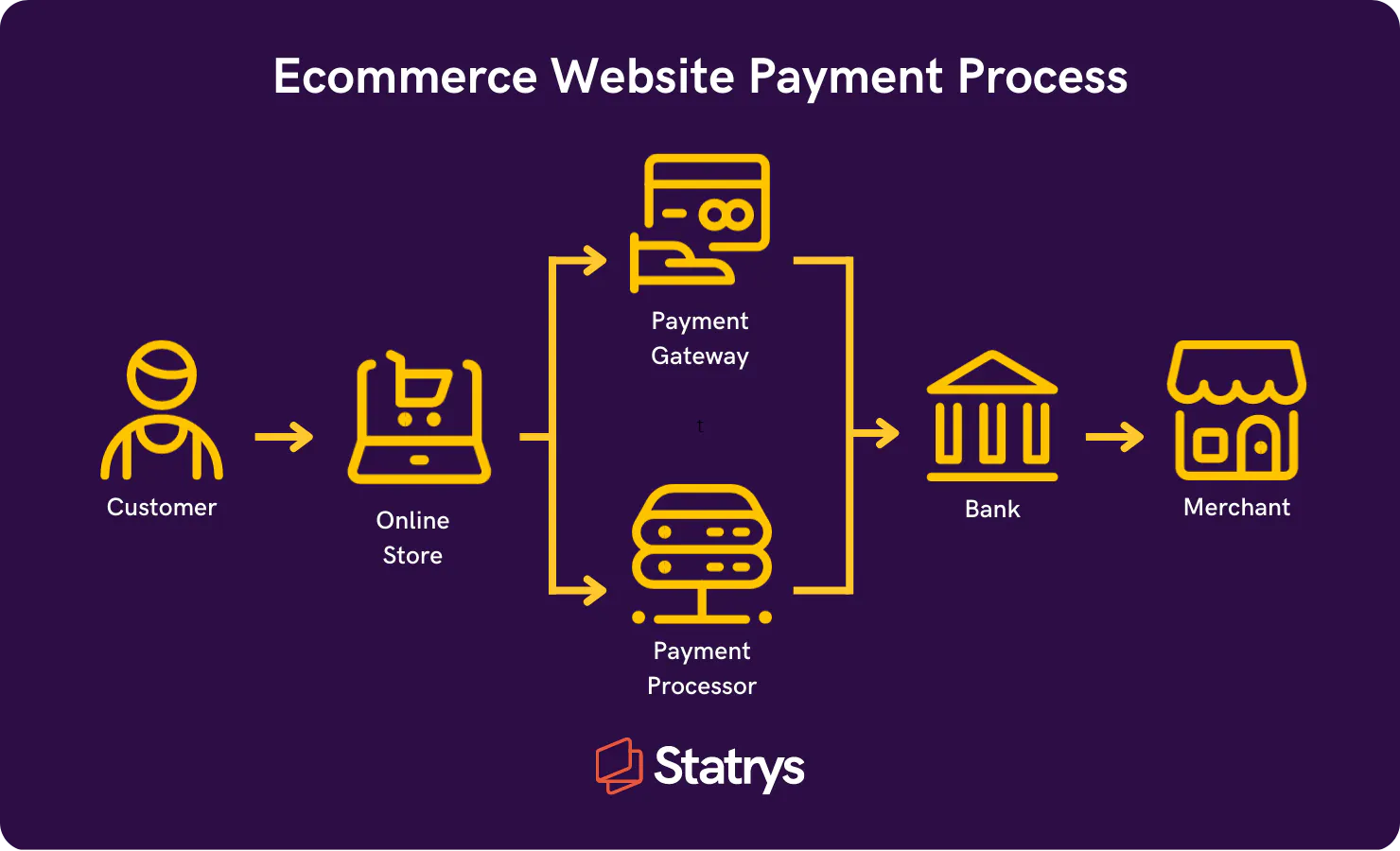
Your online business is not officially an ecommerce store until it can accept credit card payments and process digital transactions. For that to happen, you’ll need two payment solutions:
You can think of a payment gateway as a virtual point-of-sale card reader. Its job is to accept credit cards from customers, verify the card details, and then submit the information to your payment processor.
The payment processor, on the other hand, is a merchant service that processes transactions. Once it picks up the card details from your payment gateway, they’re relayed to the customer’s bank for authorization. Then if everything checks out, the funds are remitted through the payment network to your account.
The two services don’t have to be separate, though. Some payment processors happen to double up as payment gateways. That means that they not only accept and validate cards but also act as an intermediary between customers’ banks and merchant accounts.
💡Tip: Examples include Stripe, PayPal, and Square
.To pick out the ideal one for your online store, we’d advise you to consider these factors:
Over 50% of global consumers agree that delivery speed affects their purchase decision, and 38% said free or discount shipping influences their decision. Likewise, 86% of global consumers cite product return policy as a decision factor when choosing where to purchase.
That said, having the policy in place is beneficial for the checkout experience.
Shipping solutions are usually included with the ecommerce website builders package. You can set either real-time shipping rates or flat rates based on order totals.
As for your shipping strategy, you can ship from your own place, use a dropshipping company that supplies and ships the products for you, or use a third-party logistics company that stores and ships the products for you. Check out services that can be integrated with your ecommerce store, like Shipstation or Shippo
Ecommerce websites typically collect information from visitors that may be protected by data privacy laws such as the California Consumer Privacy Act (CCPA) and the General Data Protection Regulation (GDPR).
Personal information is legally defined as any data that can directly or indirectly identify an individual or household.
Your website might collect this type of data if you:
Your website must meet the requirements of any applicable privacy laws so you don’t get fined or penalized for noncompliance.
Most of these laws require you to present users with a privacy policy explaining what data you collect, how you use it, if you share it with any third parties, and what rights your users have over their information.
In addition, many third-party services, such as Google Ads and Analytics, require ecommerce sites to publish a privacy policy as part of their terms of use agreement.
To simplify compliance with privacy laws, consider using a website privacy policy generator that includes the clauses required by the privacy laws that apply to your business so you can quickly create one of these documents for your ecommerce store.
Before launching your ecommerce store, it's crucial to ensure its proper functioning and user experience. Consider the following testing aspects:
When the ecommerce site finally takes shape, you can begin setting up the foundation for business growth. Ecommerce analytics tools, in particular, are great additions as they’ll be tracking Key Performance Indicators (KPIs) – from which you’ll get valuable insights for informing your business decisions.
Some of the most basic ecommerce metrics to consider are:
To track the KPIs, you could start by activating built-in analytics tools in your ecommerce platform.
Shopify users, for instance, should be able to use Shopify Analytics to monitor online store sessions, average order value, conversion rate, return customer rate, etc.
WooCommerce Analytics does the same on WordPress. Once you set it up, you’ll be getting reports on stock levels, taxes, coupons, revenue, orders, etc.
Otherwise, to keep tabs on the traffic gained from paid advertising and search engine optimization efforts, you could add Google Analytics to your website and also register an account on Google Search Console then connect it to your ecommerce website.
And that’s all it takes to build an ecommerce website.
You can give the project about 100 hours or so, most of which will be spent on setting up product pages and optimizing their content for SEO. Another thing that might take up a significant chunk of your time is website testing.
If you want a cheaper alternative, the best would be a storefront on any of the popular online marketplaces. You could, for instance, create an online dropshipping business on Amazon for less than $50 a month.
Otherwise, if you happen to be a high-capital investor, you could save yourself all that trouble by acquiring an established business instead.